Smart components

Boards that keep your team’s rules.

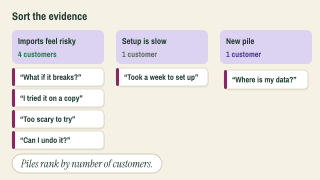
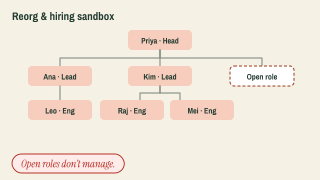
Run a workshop, a launch plan or a triage board, or build your own. Each is a smart component: a board drawn as real notes on your slate that keeps your team’s rules. A move that breaks a rule is refused in the rule’s own words, for people and agents alike, and you change a rule by saying so. The simplest is a workshop of three lanes with a limit, as here.

The button opens a private slate with “Make a workshop with Now, Next and Later, limit Now to two cards” as its opening message. Choose Draft from this brief, then Keep changes. The sentence also stays on the slate as a note you can delete. It is free and uses no AI.

Smart components: boards that keep their rules.

19 smart components so far, and the list keeps growing. Build your own

The library keeps growing because it is shared. Build your own by chatting with Slatebox on a new slate: start from scratch or branch off one of these, choose its category, and drag the controls on the board to set how it behaves. Save it to use it yourself, or share it: once reviewed, anyone can use it. Browsing and copying are free; building in chat uses AI, which comes with Slatebox Pro or is paid from a balance.

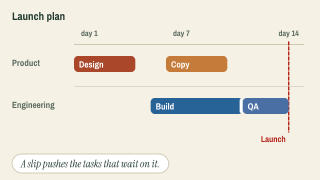
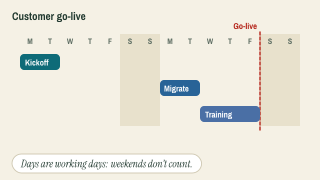
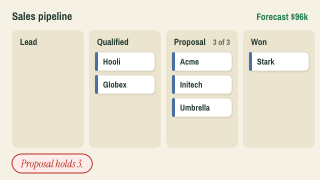
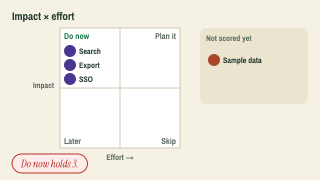
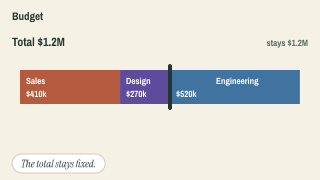
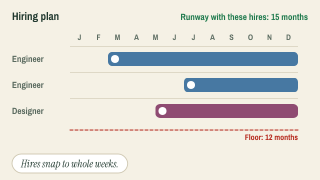
Watch the sales pipeline, impact × effort and the $1.2M budget keep their rules on the real canvas Watch a launch plan stop at launch day

From the community

What people are building.

Anyone can build a smart component by chatting with Slatebox on a new slate, from scratch or by branching off one already in the library, and share it. Each one is reviewed before it is published, then anyone can open a copy or branch off it.

Nothing the community built is published here yet. The first ones to pass review will show here, newest first. Until then, branch off a board built into Slatebox and make it yours.

Lane boards, the simplest kind

Lanes that count, budgets that add up, maps with one way through.

Each board below is a real workshop on a real canvas, replayed from a short script. The moves are decided by the workshop’s own rules, not by the script.

A full lane says no, and says why

Limit a lane to two cards. A third one glides back to where it came from, and the lane shows the reason for a moment. A card can also be tied to the lanes it belongs in.

What the lane saysIt already holds 2 of 2 cards.

A budget that adds up on the lane

The $600 starter has three $200 cards and three places to spend them. Move a card and the lane works out what the money there buys.

On a phone, the lanes wrap

One lane to a row, at a size a thumb can use. Carry a card toward the edge and the canvas follows.

Two people, one board

You see each other’s pointers. A teammate’s card glides into place on your screen as soon as their move is saved.

A map with one way through

Stations joined by arrows, and a token that can only follow them. Each stop says what happens there.

Rename it where it stands

Double-click a lane or a card and type. The name changes on the note itself.

Design partner pilot · $600 launch budget4 lanes · 3 cardsPrivate
This week3 lanes · 4 cardsPrivate

Find it again by its lanes

In My Slates a workshop’s card shows the board itself, with its lanes and cards counted underneath. You do not have to open it to remember which one it was.

Three ways to start

Name the lanes, describe the decision, or start from a drawing.

Name the lanes

The Build a workshop starter writes the sentence for you. Change the names, add a limit, and keep the preview. A workshop has two to five lanes, and no AI is involved.

You can typeMake a workshop with Ideas and Pilot, limit Pilot to two cards

Describe the decision

Say what you are deciding in your own words. Slatebox’s agent drafts the lanes, the cards and the rules, and nothing lands on the slate until you keep it. What you keep is an ordinary workshop you can rearrange.

Start with “Make a workshop”. A message that starts any other way is drawn as notes, not lanes.

You can typeMake a workshop to choose two experiments this quarter from annual pricing, a mobile app, a referral program and a partner webinar.

Start from a drawing

On a slate with two to five connected notes, each note becomes a station and each arrow a route. The map is drawn beside your drawing, which stays as it was.

You can typeMake this drawing interactive

More on interactive diagrams

One canvas

The workshop sits beside the drawing it is about.

Lanes and cards are notes on the ordinary slate. You pan and zoom across both, the minimap shows both, and the notes you drew stay where you put them.

On the slate
Your drawing and the workshop, side by side.
At once
One person adds a step to the drawing while another sorts the cards.

Workshops are free. AI drafts of them come with Slatebox Pro.

Free for everyone
Build a workshop by naming its lanes or from a drawing, add and move cards, set limits and routes with one line each, rename in place, sort it with the people you invite, and present it.
Slatebox Pro
AI drafts of a workshop from a description of the decision, and changes one when you ask in your own words: included with Slatebox Pro, or paid from a balance.
See pricing

Next

Start with three lanes.

The button opens a private slate with the request beside it. Or open the $600 budget and move the money.