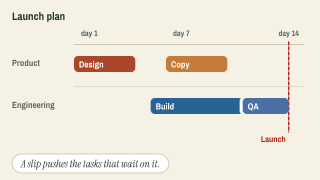
Launch plan
Tasks on real dates toward launch day, with your rules
The rule, in its own wordsA slip pushes the tasks that wait on it.
- Slide a task: what waits on it follows.
- Past launch it stops.
Say it in any slate“Add a launch plan”
 Slatebox
Open app
Add one from the library or ask for it in chat. Every card is a note: drop a note on a board and it becomes a card, drag it off and it is a note again. A move that breaks a rule is refused in the rule’s own words, for people and agents alike, and you change a rule by saying so.
One board per slate for now. The loops below are drawn from what each board does; the pages they link to show it on the real canvas.
Tasks on real dates toward launch day, with your rules
The rule, in its own wordsA slip pushes the tasks that wait on it.
Say it in any slate“Add a launch plan”
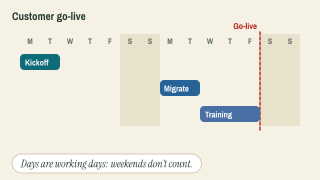
Us and the customer, toward one go-live date
The rule, in its own wordsDays are working days: weekends don’t count.
Say it in any slate“Add a customer go-live”
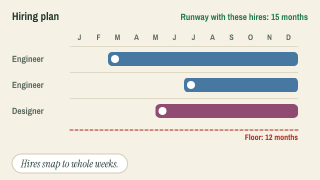
Hires over the year, with runway
The rule, in its own wordsHires snap to whole weeks.
Say it in any slate“Add a hiring plan”
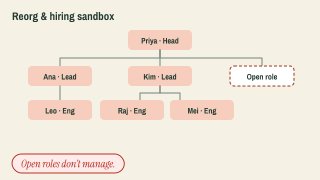
Try who reports to whom before you announce it
The rule, in its own wordsOpen roles don’t manage.
Say it in any slate“Add a reorg & hiring sandbox”
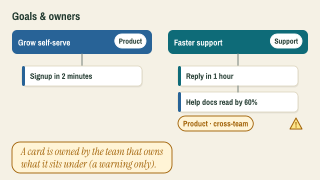
Objectives, key results and the teams that own them
The rule, in its own wordsA card is owned by the team that owns what it sits under (a warning only).
Say it in any slate“Add a goals & owners board”
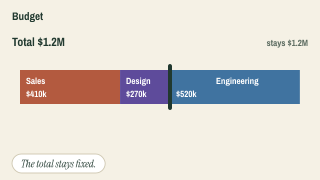
Split a fixed total across teams
The rule, in its own wordsThe total stays fixed.
Say it in any slate“Add a budget”
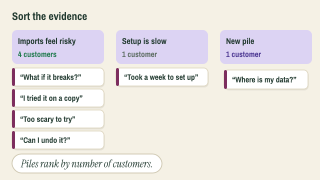
Pile up what customers said; piles rank as you sort
The rule, in its own wordsPiles rank by number of customers.
Say it in any slate“Add a board to sort the evidence”
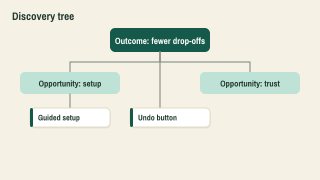
Outcome, opportunities, solutions: what to build next
The rule, in its own wordsSolutions sit under an opportunity.
Say it in any slate“Add a discovery tree”
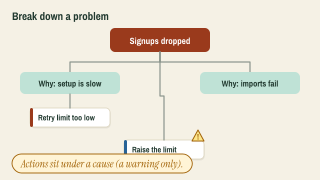
Ask why until you reach causes you can act on
The rule, in its own wordsActions sit under a cause (a warning only).
Say it in any slate“Add a board to break down a problem”
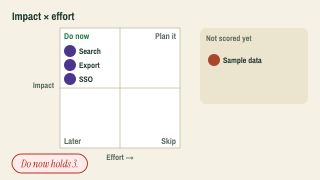
Score ideas on two axes; Do now holds 3
The rule, in its own wordsDo now holds 3.
Say it in any slate“Add an impact × effort board”
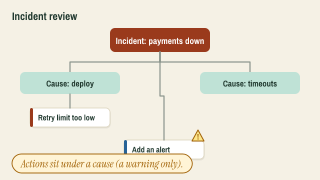
What broke, why, and what to fix
The rule, in its own wordsActions sit under a cause (a warning only).
Say it in any slate“Add an incident review”
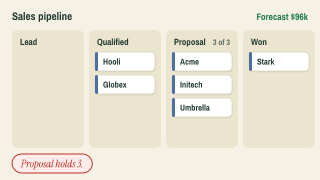
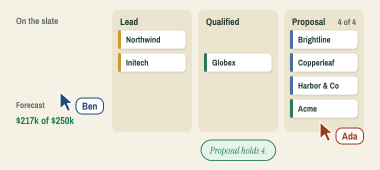
Move deals through stages toward a target
The rule, in its own wordsProposal holds 3.
Say it in any slate“Add a sales pipeline”
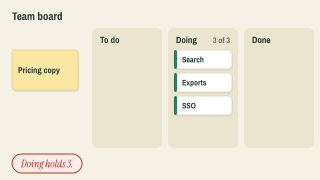
Drop a note in a lane and it becomes a card; drag it out and it is a note again. A full lane refuses, in its own words.
“Add a launch plan”, “Add a sales pipeline”, “Let Proposal hold 4”. The board is added beside your notes, and its rules change when you say so.